How Can Your AGV Outrun "Double 11"?
— A Practical Industrial Panel PC Selection Playbook for AGV Project Leaders
What's the most terrifying scene you've ever seen in a Double 11 warehouse?
It's not the mountains of packages. It's not the endless beeping of barcode scanners. It's — your AGV's screen going black at the busiest moment of the day.
It stops dead in the middle of the racks. The fleet behind it backs up in a long queue. The dispatch system starts screaming alarms. The warehouse supervisor rushes over: "What's wrong with this thing?" You crouch down: the screen is dead. You touch the back — it's hot enough to fry an egg.
In that moment, there's only one thought in your head:Why didn't I think of this when I was selecting the hardware?
If you're running an AGV project, or you've just been handed a warehouse automation requirement — this article is for you. No fluff. Just one thing: in the triple hell of "mobile + industrial + 7×24," how do you actually select anindustrial panel PC? And what does it cost you if you get it wrong?
Read this, and you'll avoid at least 80% of the pitfalls.
When engineers pick a screen for an AGV for the first time, their thinking usually goes like this:
"It's just an industrial screen plus a mini PC. Just grab any industrial panel PC and stuff it in, right?"
That sentence has ruined countless projects.
Why? Because the AGV's working environment is a completely different world from what you imagine sitting in your office. Let's do the math —
| What You Think an AGV Is | What an AGV Actually Is |
|---|---|
| Smooth ride, occasional bump | Motor vibration + floor seams + hard braking, high-frequency vibration all day long |
| Constant temperature, constant humidity | Summer floor temp 50°C+, cold chain warehouse -10°C, a 60°C temperature swing |
| Clean environment | Cardboard debris, mopping water, hydraulic oil splashes — dust + liquid double hit |
| One screen per vehicle | Must connect to PLC, barcode scanner, vision camera, WMS — missing even one port and you're dead |
| Works during the day, charges at night | Three shifts, non-stop, 7×24 uptime is the bare minimum |
You see, the industrial panel PC on an AGV isn't a "computer." It's an edge computing node that must survive on a moving battlefield.
It has to withstand simultaneously: vibration, extreme heat, extreme cold, dust, liquids, 24/7 continuous operation, multi-device real-time communication.
If any one link fails, your project will start "blowing up" in the third month after delivery.
99% of selection guides out there teach you to check resolution, brightness, touch method. Sure, those matter. But in AGV scenarios, those are just the passing grade — not the winning factor.
What actually decides life or death for your project are these five gates. Let's go through them one by one.
This is the most important gate. Period.
You might not know this, but one of the biggest differences between a consumer PC and an industrial PC is thermal management. Consumer PCs rely on fans. And fans have two fatal problems:
Fans are the #1 failure point.Dust and debris in industrial environments get sucked into the fan, accumulate on the heatsink, reduce cooling efficiency → temperature rises → system throttles → crash.
Fans pull external contaminants into the chassis.In an AGV's dust + liquid environment, a fan is actively "snorting poison."
That's why you'll notice: every truly reliable AGV industrial panel PC is almost alwaysfanless.
It uses precision-designed heatsink fins and thermal conduction structures to passively transfer CPU heat to the entire metal enclosure, then dissipate it into the air. No fan = no dust intake = no #1 failure source.
Selection rule: Any industrial panel PC used on an AGV must be fanless. If it has a fan, pass immediately. Don't even look twice.
An AGV's vibration frequency while driving is roughly 5–50Hz, plus hard braking, turning, speed bumps — daily shock counts easily exceed 100,000.
What happens to a regular screen's LCD module and ribbon cables under that kind of sustained vibration?
So an AGV industrial panel PC must have:
Selection rule: Check if the product passed MIL-STD-810H vibration testing. If not, think twice.
Can you guarantee your AGV will never touch water in a warehouse?
Mopping water, cold storage condensation, occasional hydraulic oil splashes… these are daily occurrences.
So the industrial panel PC's front panel must be at leastIP65(dust-tight + protected against water jets). If your AGV goes into cold chain or outdoor scenarios, go straight toIP67.
Also, something many people overlook: fanless design is itself the best protection. No air intake means dust and liquid can barely enter the chassis — this is more reliable than just stacking up IP ratings.
Selection rule: IP65 is the minimum. Prioritize fanless + high IP rating combinations.
This spec gets ignored a lot during selection, but it's a "silent killer."
Regular industrial PCs typically operate at 0°C ~ 50°C. But what's an AGV's actual environment?
| Scenario | Temperature |
|---|---|
| Summer warehouse floor | 40–55°C |
| Cold chain warehouse | -10°C ~ -20°C |
| Northern winter outdoor | Below -20°C |
If your panel PC only works above 0°C, it's a brick in a winter cold chain warehouse.
A reliable AGV industrial panel PC must cover at least-20°C ~ 60°C, or wider. It also needs wide-voltage input support (e.g., 9–36V DC), because an AGV's power system fluctuates across different charge states.
Selection rule: Operating temp at least -20°C ~ 60°C, wide-voltage input, preferably with over-voltage/under-voltage/short-circuit protection.
An AGV is not an island. It communicates in real-time with the entire warehouse system:
| Device to Connect | Interface Needed |
|---|---|
| PLC (Programmable Logic Controller) | RS232 / RS485 / CAN Bus |
| Barcode Scanner | USB / RS232 |
| Vision Camera (navigation or recognition) | GMSL2 / USB 3.0 |
| WMS (Warehouse Management System) | Ethernet (RJ45) |
| Wireless Comms (4G/5G/WiFi) | SIM slot / WiFi antenna connector |
| Status LEDs, E-Stop Button | DI/DO (Digital In/Out) |
If your industrial panel PC doesn't have enough ports, you'll be daisy-chaining adapters and hubs. On an AGV where every centimeter counts, every extra device means one more cable, one more failure point, one more gram of weight.
Selection rule: More ports than you think you need. Prioritize native CAN Bus, RS485, multi-channel USB, dual Ethernet. If it can be integrated, don't hang it externally.
If you've made it this far, you probably already know what you need. But if you're still thinking "too many specs, too lazy to check one by one" — here's a battle-tested answer:
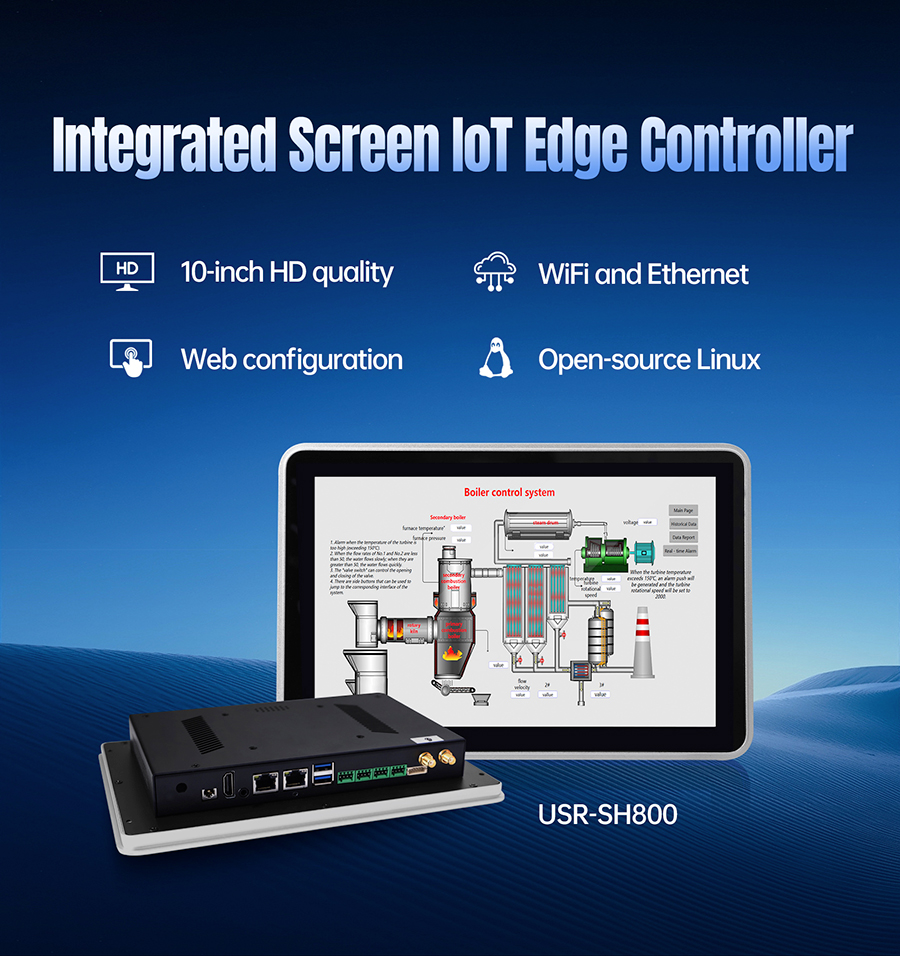
USR-SH800 industrial panel PC.
Why? Because it's basically designed from AGV's requirement checklist:
| AGV Requirement | USR-SH800 Capability |
|---|---|
| Fanless cooling | Fully passive thermal design, zero fans, dust-proof |
| Shock & vibration resistance | Internal component reinforcement + locking interfaces, industrial-grade |
| High IP rating | Front panel IP65, no air intake design eliminates contamination |
| Wide temperature range | -20°C ~ 60°C operation, wide-voltage input + multi-circuit protection |
| Rich I/O | Native RS232/RS485/CAN Bus/multi-USB/dual Ethernet — no adapters needed |
| Compact form factor | Industrial panel PC design, saves AGV interior space, easy install |
| Long lifecycle | Industrial-grade components, 5+ years stable supply, no discontinuation risk |
| Modular expansion | AI accelerator module, 4G/5G comms module, add on demand |
Plainly put: the USR-SH800 isn't an industrial PC that "barely works on an AGV." It's a productspecifically optimized for this kind of mobile industrial scenario.
You don't need to cross-check dozens of specs. You don't need to worry about problems in month three after delivery. Pick this, and you'll at least sleep soundly.
After years of running AGV projects, I've seen too many stories like this:
The budget gets cut again and again. During selection, it feels like "close enough is fine." Then three months after delivery, the screen glitches. Six months later, the motherboard fries. A year later, the supplier discontinues the product. You do the math — every penny you "saved" on selection gets paid back tenfold in after-sales costs and downtime losses.
The industrial panel PC on an AGV is not a "as long as it lights up" display. It's theeyesand thebrainof your entire production line.
If the eyes go blurry, the vehicle goes blind. If the brain crashes, the entire dispatch system goes down.
So spend a little more time upfront. Go through the five gates: thermal, shock, protection, temperature, interfaces. Every minute you spend today saves you an hour of downtime tomorrow.
If you're picking a screen for your AGV and don't know how to finalize the plan — come talk to us. We can help you nail the configuration in one go based on your actual scenario — cold chain or ambient? Indoor or outdoor? What devices are you connecting to?
After all, your AGV isn't just racing against orders. It's racing against time.