ROS2/Autoware.Auto On-Vehicle Reality Check: How Embedded Single Board Computers Accelerate AGV Autonomous Navigation Algorithm Deployment
One sentence before we start:
Your AGV algorithm runs silky smooth in simulation—but the moment it hits the real vehicle, it "can't adapt." It's not the algorithm's fault. You picked the wrong board.
I bet you're going through this:
ROS2 navigation nodes tuned for three months. Autoware.Auto perception fusion finally working. Gazebo simulation—AGV obstacle avoidance is flawless. You say with full confidence: "Let's test on the real vehicle."
Then—
LiDAR data stutters, frequency drops from 10Hz to 3Hz.
Localization drifts—you're clearly at point A, but the system says you're two meters behind.
Not enough compute—CPU pegs at 100%, path planning latency exceeds 500ms.
Under vibration, the SD card loosens, system keeps rebooting.
Not enough interfaces—you bought a bunch of adapter boards, turned your AGV into an "octopus."
You start doubting yourself: Is the algorithm bad? Or am I bad?
Neither.
It's the "brain" you gave the algorithm—it can't handle the reality of a real vehicle.
A consumer-grade dev board is a god in the lab. On an AGV, it's a ticking time bomb. This isn't a technical problem. It's a selection problem.
This article isn't about algorithms. It's about one thing:how much can the right embedded single board computer shorten your algorithm deployment cycle?
Before we talk selection, let's list the "enemies" on a real AGV clearly.
| Enemy | Specific Manifestation | Hardware Requirement |
|---|---|---|
| Compute Black Hole | ROS2 + Autoware.Auto running simultaneously, CPU/GPU usage permanently 80%+ | Multi-core high-performance CPU, preferably with GPU acceleration |
| Real-Time Data Tsunami | LiDAR 10Hz point cloud + camera 30fps + IMU 200Hz | I/O bandwidth must be large enough, no bottlenecks |
| Vibration & Shock | AGV start/stop, speed bumps, uneven ground | Board must be vibration-resistant, interfaces must be secure |
| Electromagnetic Interference | Motor drivers, relays, wireless modules densely packed | EMC design is mandatory, not a bonus |
| 7×24 Continuous Operation | AGVs in the warehouse can't stop—every minute down is money | Industrial-grade lifespan, not consumer-grade "works fine" |
| Temperature Swings | Warehouse: 40°C in summer, near 0°C in winter | Wide-temperature design, can't rely on air conditioning |
You see, this isn't "just running ROS." This is fighting the entire physical world.
The industrial PC world has a proven saying:a ruggedized computing device doesn't exist for "durability." It exists for "not failing where it shouldn't fail."
AGV is exactly "where it shouldn't fail."
Many engineers only look at one thing during selection: Can it run?
"Can run" is enough? Far from it.
Let's tear open ROS2 and Autoware.Auto architectures and see what hardware resources they're actually "eating":
| Component | What It Consumes |
|---|---|
| AMCL Localization Node | Continuously processes LiDAR point clouds, sensitive to single-core CPU performance |
| DWB/Smac Planner | Real-time path calculation, requires multi-core parallelism |
| TF Tree & State Publishing | High-frequency TF broadcasting (100Hz+), demands bus bandwidth |
| DDS Communication Middleware | ROS2's underlying comms, hidden consumption of memory and network I/O |
Conclusion: It's not "can run." It's "runs stably, runs in real-time."
This is even tougher. Autoware.Auto is a complete autonomous driving software stack:
| Module | What It Demands |
|---|---|
| Perception | LiDAR point cloud processing + camera object detection (YOLO etc.)—GPU is almost mandatory |
| Localization | NDT/ICP point cloud registration—CPU-intensive |
| Prediction & Planning | Behavior prediction + motion planning—latency-sensitive |
| Control | Lateral/longitudinal control—hard real-time requirements |
Autoware.Auto's official minimum recommended spec:Intel i7-level CPU + NVIDIA GPU + 16GB RAM.
But that's just "can run." On an AGV, you also need:
This is why algorithms that are perfect in simulation "crash" on the real vehicle—it's not the algorithm.You gave it a paper-thin body.
From countless AGV project failure cases, we've distilled four most common selection traps:
Jetson Nano runs a simple SLAM demo fine. But run Autoware.Auto's perception + localization + planning simultaneously?
Its 4-core A57 + 128-core Maxwell GPU—under multi-sensor fusion, CPU pegs at 100%, GPU can't breathe either.
Result: Localization latency spikes from 50ms to 800ms. AGV stands still "thinking about life."
Raspberry Pi, Jetson Orin Nano dev kits—great in the lab. But their interfaces are consumer-grade, SD cards are plug-in, PCBs are un-reinforced.
AGV vibrates, SD card loosens, system crashes. That afternoon you spent squatting in the warehouse rebooting the machine? That's the price of this trap.
One of the core values of an industrial PC:it solves the problems consumer products won't tell you about—before they happen.
Things to connect on an AGV: LiDAR, depth camera, IMU, wheel encoders, motor drivers, safety relays, barcode scanner, display…
If the board's I/O isn't rich enough, you need USB hubs, serial expansion boards, CAN adapters. Every adapter = one more failure point = one more cable = one more EMC risk.
In industrial scenarios,simplicity is reliability.
This is the most expensive way to "save money."
Dev phase: consumer board, algorithm tuned. Mass production: temperature range too narrow, lifespan too short, EMC fails, interfaces don't match. Start over from scratch.
Industrial-grade "long lifecycle" design isn't so you can use it a few more years.It's so you don't take wrong turns during development.
Enough traps. Let's talk solutions.
If you're selecting hardware for an AGV project and need an embedded single board computer that can run ROS2/Autoware.Auto, survive real-vehicle conditions, has enough I/O, and won't break the budget—
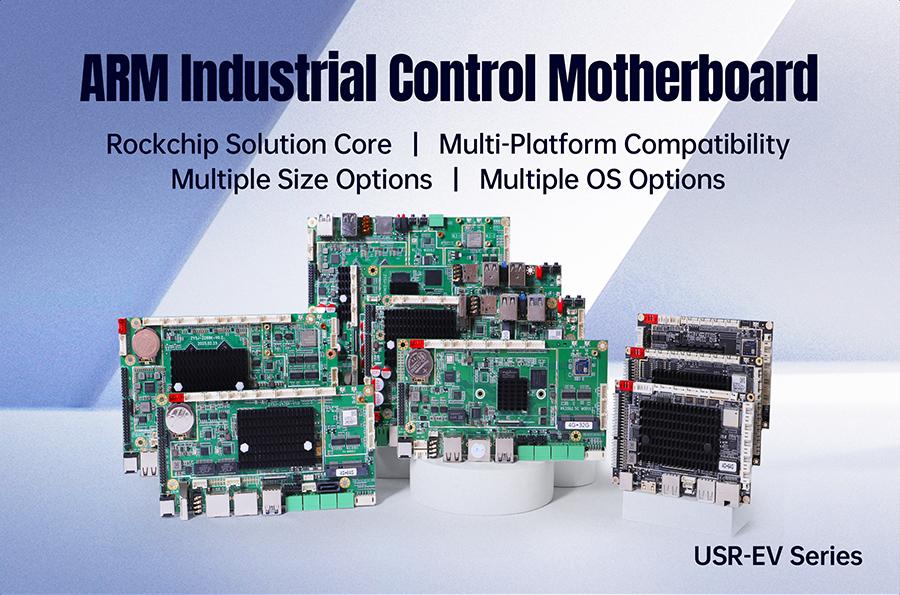
USR-EV series might be the option you can't avoid.
It's not the "most powerful" board. It's not the "cheapest" board. But it's thebest balance pointin the "performance–reliability–cost" triangle for AGV on-vehicle deployment.
USR-EV series features high-performance multi-core processors with large-capacity high-speed memory. ROS2 Navigation2 + Autoware.Auto core modules run simultaneously and smoothly.
More critically: it's not "peak performance looks good"—it'ssustained performance stability.Industrial-grade thermal design ensures the CPU won't throttle due to thermal limits—in long-running AGV scenarios, this matters ten times more than peak performance.
Algorithm engineers don't fear "can't run." They fear "running fine, then slowing down." USR-EV won't let that happen.
AGV structures vary wildly—some have a small screen on top, some have a full-face large display, some need embedded mounting in the chassis.
USR-EV series offers multiple size options, from compact to large-screen, covering mainstream AGV installation needs.
Not making your AGV adapt to the board. Making the board adapt to your AGV.
This one deserves its own section.
During on-site AGV debugging, engineers' hands are often gloved, oily, or even wet. Ordinary touchscreens under these conditions: three mis-taps out of ten.
USR-EV series touchscreen is specially optimized—glove operation remains precise, wet-hand touch still responds accurately.
You might think this is minor. But when you're squatting in the warehouse tuning parameters, hands covered in dust, desperate to get the AGV running—you'll know how much a good touchscreen is worth.
| Interface Type | Quantity/Spec | Typical Connected Devices |
|---|---|---|
| USB 3.0 | Multiple | LiDAR, depth camera, barcode scanner |
| Gigabit Ethernet | Multiple | Switch, remote debugging |
| COM/RS232/RS485 | Multiple | PLC, motor driver, safety relay |
| CAN Bus | Supported | Chassis CAN, sensor CAN |
| GPIO/DIO | Multiple | Status indicator, emergency stop signal |
| HDMI/DP | Supported | External display, debugging large screen |
Zero adapters = zero failure points = zero latency = zero EMC risk.
In AGV scenarios with extreme real-time demands, every adapter you remove makes the system more stable.
| Feature | What It Solves |
|---|---|
| EMC Shielding | Motor drivers, relays, wireless modules are dense on AGV—EMC is extremely complex. USR-EV's shielding ensures LiDAR point clouds stay true, IMU data doesn't drift. |
| Vibration Resistance | AGV start/stop, bumps, turns—vibration is constant. Industrial-grade PCB reinforcement and interface locking keep the system stable under continuous vibration. |
| Wide Temperature | Supports -20°C~60°C (or wider). Warehouse, cold chain, outdoor—all covered. |
These three things? Consumer boards can't give you. But they're exactly the"last mile"from simulation to real vehicle.
In the "fanless + EMC shielding + rich I/O + wide temp + vibration resistant" configuration combo, USR-EV series pricing is very competitive.
Our philosophy is simple:AGV's future is mass deployment, not lab demos.A good embedded single board computer should be affordable for every AGV—not let "reliability" become the budget's enemy.
| AGV Function Module | USR-EV's Role | Why Choose It |
|---|---|---|
| Autonomous Navigation (Nav2) | Runs AMCL localization + DWB/Smac planner | Sustained CPU performance, no throttling, no lag |
| Perception Fusion (Autoware) | Runs LiDAR point cloud processing + camera detection | Sufficient compute, optional GPU acceleration |
| HMI Interaction | Runs Qt/RViz visualization interface | Touch-sensitive, operable with gloves |
| Sensor Data Collection | Connects LiDAR/IMU/encoder/wheel speed sensor | Rich I/O, direct connect, no adapters |
| Communication Gateway | CAN/RS485/Ethernet multi-protocol conversion | Full interfaces, one board does it all |
| Safety Monitoring | E-stop signal, status indicator, anomaly alarm | GPIO/DIO + 7×24 stable operation |
One board covers the entire AGV chain from perception to decision to interaction. This is what "on-vehicle" should look like.
Before you make the final call, ask yourself these six questions:
| # | Question | Your Answer |
|---|---|---|
| 1 | Can this board run Nav2 + Autoware core modules simultaneously without throttling? | ? / ? |
| 2 | Can the touchscreen be operated normally with gloves? | ? / ? |
| 3 | Are there enough interfaces, or do I need adapter boards? | ? / ? |
| 4 | Is there EMC shielding? Will sensor data drift? | ? / ? |
| 5 | Is it vibration-resistant? Will the system crash under continuous vibration? | ? / ? |
| 6 | Can this price let me use it from dev to mass production without swapping boards? | ? / ? |
Six "?"—you chose right. Any "?"—you don't need a cheaper board.You need an embedded single board computer truly designed for on-vehicle use.
AGV's future isn't about who has the flashiest algorithm. It's about who has the most stable system.
Algorithms that run beautifully in simulation but can't get on the vehicle are worth zero. And "getting on the vehicle" was never the algorithm engineer's solo battle—it needs a board that truly understands the industrial environment to carry all your computation.
USR-EV series isn't the strongest compute monster. But it might be the "most right board" to take your AGV from the lab to the warehouse.
ROS2/Autoware.Auto is ready. Is your hardware?
If you're selecting hardware for an AGV project, contact us for USR-EV series detailed specs and deployment support. Let algorithm deployment save you three months of detours.


















