PLCs, metering instruments, and POS terminals on the factory floor typically carry only RS232 or RS485 interfaces. As control systems move toward full Ethernet deployment, these devices need a way to join existing industrial networks without hardware replacement. A Serial to Ethernet Converter (also called a Serial Device Server) provides the answer: it carries serial data transparently over IP networks, giving legacy equipment direct networking capability.
The following walks through selection, network topology, and commissioning—steps that can be applied in mid-sized automation projects.
The first step is identifying the interface types present on-site.
Port count determines how many devices a single converter can handle. When installation space is limited—such as in distribution boxes or compact control cabinets—the USR-DR132/DR134 "lipstick"-size serial device server offers a compact footprint with DIN-rail or adhesive mounting options, one unit per instrument.
Scenario: One or two devices need network access, and the monitoring host is nearby.
Implementation: Connect the device's RS232 or RS485 port directly to the converter's serial interface, plug the converter into a nearby industrial switch via Ethernet cable, and connect the monitoring host to the same switch or subnet.
Advantages: Simplest configuration. One converter per device, clear IP planning. Suitable for connecting individual sensors or meters to a SCADA system.
Scenario: Multiple RS485 instruments (energy meters, water meters, environmental sensors) need centralized data collection.
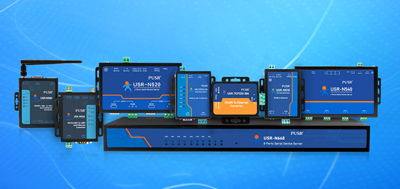
Implementation: Hang multiple RS485 devices onto a single multi-port converter. The USR-N540 (4-port RS485-to-Ethernet), for example, supports four independent RS485 buses, each serving instruments in a different zone, with data aggregated at a central monitoring station.
Advantages: One multi-port unit replaces multiple single-port devices, reducing IP address consumption and configuration overhead. Ideal for energy management, building automation, and instrument-heavy environments.
Scenario: Devices are spread across multiple workshops or factory campuses and need centralized management via LAN or WAN.
Implementation: Deploy a converter at each site as a TCP Client connecting to a central server, which polls all sites uniformly. The USR-TCP232-410s supports TCP Client mode with built-in auto-reconnect, resuming communication automatically after network interruptions.
Advantages: Leverages existing IP infrastructure for remote management without serial distance limitations. Suitable for cross-campus data acquisition and remote equipment maintenance.
After selection and topology decisions, commissioning determines whether the solution runs reliably long-term.
Step 1: Physical layer check.Verify RS232 cable TX/RX cross-wiring (straight-through vs. null-modem crossover) and RS485 A/B polarity reversal. This is the most common on-site connection issue.
Step 2: Network layer check.Assign a static IP to the converter and use ping to verify connectivity. Confirm the converter IP and monitoring host share the same subnet, and that firewalls do not block the target port.
Step 3: Serial parameter matching.Set baud rate, data bits, parity, and stop bits in the converter's Web configuration page. Parameters must match the serial device exactly. Baud rate mismatch is the most frequent cause of garbled data.
Step 4: Communication mode selection.Converters typically support TCP Server, TCP Client, and UDP modes.
Step 5: Virtual COM verification.After installing the virtual COM driver on the monitoring host, the converter's IP and port are mapped to a local virtual COM port. Existing serial-based monitoring software reads remote data without modification, which is critical for preserving legacy applications.
Step 6: Long-term operation validation.Industrial equipment runs 7x24 without interruption. Confirm the converter supports a hardware watchdog that auto-recovers when the firmware freezes. Confirm the operating temperature range covers the on-site environment; industrial-grade converters typically support -40°C to +85°C wide-temperature operation.
Data security.When transmitting serial data over public or wide-area networks, confirm the converter supports SSL/TLS encryption. The USR-TCP232-410s supports SSL/TLS encrypted communication across TCP Client, HTTP, and MQTT modes, preventing data interception or tampering during transmission.
IoT expansion.Some converters include built-in MQTT protocol support and edge computing capabilities, performing data collection and format conversion (e.g., JSON output) at the device side and reducing central server load. The USR-TCP232-410s supports up to 300 data points for edge acquisition reported in JSON format; the USR-DR132/DR134 supports up to 25 data points. Both are suitable for cloud-pushing scenarios.
Mounting method.DIN-rail mounting suits fixed installation in electrical cabinets; adhesive or screw mounting fits space-constrained distribution boxes; wall-mount installation works for outdoor control enclosures. The USR-DR132/DR134 features a "lipstick"-size design with push-type pluggable wire connectors, enabling tool-free wiring and faster installation.
The core value of a Serial to Ethernet Converter lies in giving legacy equipment without network interfaces the ability to join modern industrial Ethernet—no hardware replacement required. Selection begins with interface type and port count, topology follows site distribution (point-to-point, bus aggregation, or distributed networking), and commissioning proceeds layer by layer from physical to network to application. This approach covers the majority of serial device networking scenarios in mid-sized automation projects, significantly reducing cabling retrofit costs and shortening implementation timelines.
They refer to the same product category. "Serial to Ethernet Converter" is the common industry term, while "Serial Device Server" or "串口服务器" is the Chinese convention. Both convert RS232/RS485 serial devices for connection to Ethernet or IP networks.
Mainstream Serial Device Servers support three basic network modes: TCP Server, TCP Client, and UDP. In TCP Server mode, the device listens on a port and waits for client connections, suitable for multi-client access. In TCP Client mode, the device actively connects to a remote server, suitable for distributed data reporting. UDP mode requires no connection establishment and has the lowest latency, suitable for applications with high real-time demands that can tolerate occasional packet loss. Some higher-end models also support HTTP and MQTT IoT protocols.
A Virtual COM driver creates a local virtual COM port on the monitoring host, mapping remote serial device communication to that virtual port. This allows existing serial-based monitoring software to access remote devices over IP without modification. It is critical for preserving legacy applications and avoiding costly software refactoring.
Yes. In TCP Server mode, most Serial Device Servers allow multiple TCP clients to connect concurrently. The USR-TCP232-410s, for example, supports multi-client concurrent access in TCP Server mode, enabling multiple users to share control of the same serial device.
Transmitting serial data over public networks carries risks of interception or tampering. Industrial-grade Serial Device Servers like the USR-TCP232-410s support SSL/TLS encrypted communication across TCP Client, HTTP, and MQTT modes, with two-way certificate authentication available, providing encryption protection for data in transit.
Industrial-grade Serial Device Servers are purpose-built for harsh conditions. The USR-TCP232-410s supports -40°C to +85°C wide-temperature operation, metal housing heat dissipation, 5-36V DC wide-voltage input, and 1.5KV Ethernet electromagnetic isolation. The USR-DR132/DR134 also supports a -40°C to +85°C industrial temperature range with hardware and software dual watchdogs for auto-recovery after anomalies, suitable for long-term unattended operation.
A Serial Device Server provides transparent byte-level data transmission from serial to Ethernet without protocol parsing. A Modbus Gateway adds protocol conversion capability on top, such as translating Modbus RTU to Modbus TCP, and can perform data polling and formatting at the device side. Some products, like the USR-TCP232-410s, offer both capabilities—functioning as either a transparent Serial Device Server or a Modbus Gateway for PLC and SCADA integration.
Once connected via Ethernet or Wi-Fi, transmission distance is no longer limited by serial physics—any location with network coverage can communicate. Serial-side physical cable lengths still follow RS232 standards (up to 15 meters) or RS485 standards (approximately 1,200 meters per bus). The converter extends serial connectivity through Ethernet cables to network nodes; theoretically, it can span any distance as long as IP network reachability is maintained.