In the rapid development of Industrial Internet of Things (IIoT), the wireless access point (AP) as a core component of wireless networks holds significant importance for traditional industries. This article delves into the various networking modes of wireless APs and provides unique strategic recommendations for their applications in traditional industries.
Standalone mode is the most basic application of wireless APs, suitable for small networks or personal users. In this mode, the wireless AP serves as an independent network device, providing wireless network access services without the need for other network equipment. Users can directly connect to the wireless AP through wireless devices to enjoy the convenience of wireless networks.
Centralized control mode is suitable for medium to large enterprises or organizations that need to manage a large number of wireless APs. In this mode, wireless APs are managed and configured centrally through a wireless controller, enabling unified scheduling and optimization of network resources. The wireless controller can monitor network status in real-time, automatically adjust channels and power, and improve network performance and stability.
Mesh mode is a way for wireless APs to connect with each other through wireless signals, suitable for scenarios requiring wide-area coverage or complex environments. In a Mesh network, wireless APs can communicate with each other, forming a self-organizing and self-repairing network structure. When a wireless AP fails or has poor signal, other wireless APs can automatically take over its work, ensuring network continuity and stability.
Bridge mode is used to connect wireless APs as bridges, connecting two or more wired networks. In bridge mode, the wireless AP converts wireless signals into wired signals, enabling data transmission between different networks. This mode is suitable for connecting wireless networks to existing wired networks, such as connections between remote office locations or areas with insufficient wireless network coverage.
In client mode, the wireless AP can be used as a wireless network card for terminal devices, connecting to other wireless networks. This mode is suitable for connecting wired devices to wireless networks or connecting terminal devices to remote networks.
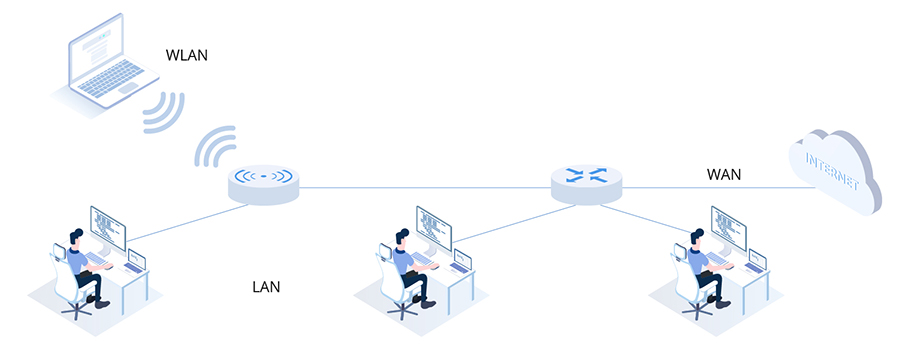
For small network environments, such as home networks or small offices, wireless APs in standalone mode can be used for networking. The wireless AP can directly connect to the wired network, providing wireless network access services for terminal devices. At the same time, security measures such as access control and encryption can be set to ensure network security.
For medium to large enterprises or organizations, managing a large number of wireless APs to meet the needs of different regions and departments can be achieved through the centralized control mode of wireless APs. Centralized management and configuration of wireless APs through a wireless controller can simplify network management, improve network performance and stability. Additionally, dynamic allocation and optimization of network resources can be performed based on actual needs to meet the demands of different departments and regions.
In complex environments or scenarios requiring wide-area coverage, Mesh mode wireless APs can be used for networking. Through the interconnection and self-organizing capabilities of wireless APs, a more extensive and stable wireless network can be formed. This mode offers higher scalability and reliability, satisfying the needs of different environments and scenarios.
When wireless networks need to be connected to existing wired networks, bridge mode wireless APs can be used for networking. The wireless AP converts wireless signals into wired signals, enabling data transmission between different networks. This mode is suitable for connections between remote office locations or areas with insufficient wireless network coverage.
Under certain special requirements, such as connecting wired devices to wireless networks or connecting terminal devices to remote networks, client mode wireless APs can be used for networking. The wireless AP serves as a wireless network card for terminal devices, connecting to other wireless networks or remote networks. This mode offers higher flexibility and adaptability, meeting the needs of different special scenarios.
In summary, wireless APs offer various networking modes and application strategies that can be selected and applied based on actual needs. For traditional industries, understanding and mastering the networking modes and application strategies of wireless APs will help to better utilize wireless network technology to promote industrial upgrading and development.
Comprehensive Guide to Selecting Wireless APs: From Scenario Adaptation to In-Depth Pain Point Resolution, Helping You Easily Deploy an Efficient Network
In today's era swept by digitalization, wireless networks have become the "infrastructure" for corporate operations and family life. However, many users still face pain points such as poor signal coverage, device disconnections, and complex management when deploying wireless APs. This article will start from three core dimensions—scenario adaptation, performance optimization, and security protection—provide systematic solutions by combining high-frequency user questions, and recommend two cost-effective products (AP520 and NR530X) to help you easily build a stable, efficient, and secure wireless network environment.
Pain Points: Users in small apartments often experience signal attenuation due to wall obstructions and improper router placement, leading to issues such as "no signal in the bedroom" and "video buffering in the bathroom."
Solutions:
Pain Points: In corporate office areas, conference rooms, hotel guest rooms, and other scenarios with high device density (e.g., 2-3 terminals per person), traditional routers are prone to frequent disconnections due to insufficient device capacity.
Solutions:
Pain Points: Outdoor scenarios such as scenic spots, parking lots, and construction sites face challenges such as rain, high temperatures, and electromagnetic interference, making traditional indoor APs prone to damage and severe signal attenuation.
Solutions:
User Question: "What is the difference between Wi-Fi 5 and Wi-Fi 6?"
Answer: Wi-Fi 6 (802.11ax) uses OFDMA technology to divide channels into multiple subcarriers, reducing latency by 75% and increasing speed by 3 times for concurrent multi-device connections. For example, with 20 devices connected simultaneously, Wi-Fi 5 latency may exceed 100ms, while Wi-Fi 6 can keep it under 20ms, making it suitable for scenarios such as online meetings and VR/AR.
Recommended Products: Both AP520 and NR530X support Wi-Fi 6, with NR530X adopting 4×4 MU-MIMO technology to achieve a peak single-user speed of 1.2Gbps, meeting enterprise-level needs.
User Question: "How to estimate the device capacity of an AP?"
Answer: Device capacity needs to be comprehensively evaluated based on device types (e.g., smartphones, computers, IoT devices) and business needs (e.g., video conferencing, file transfers). General recommendations:
User Question: "Is more antennas on a ceiling-mounted AP better?"
Answer: The number of antennas needs to match the MIMO technology. For example, 2×2 MIMO requires 2 antennas, and 4×4 MIMO requires 4 antennas. AP520 uses built-in dual-band antennas, suitable for small apartments; NR530X supports 8×8 MIMO and can be paired with external high-gain antennas to achieve 360° seamless coverage.
Tip: If directional coverage is needed (e.g., long corridors), replace with directional antennas to increase signal gain by 6-9dBi.
User Question: "What is the difference between WPA2 and WPA3?"
Answer: WPA3 adopts SAE (Simultaneous Authentication of Equals) technology, improving brute-force attack resistance by 50%. Even if the password is leaked, attackers need to try key combinations one by one, taking years. Both AP520 and NR530X enable WPA3 encryption by default to ensure secure data transmission.
User Question: "How to resolve interference from neighboring Wi-Fi signals?"
Answer:
User Question: "How to protect outdoor APs from lightning strikes?"
Answer:
Answer:
Answer:
Answer: It is recommended to log in to the AP management page (e.g., 192.168.1.1) every quarter to download the latest firmware from the manufacturer. Firmware updates can fix security vulnerabilities (e.g., KRACK vulnerabilities) and optimize performance (e.g., increase device capacity, reduce latency). For example, after updating the firmware of NR530X, a user saw the device capacity increase from 150 units to 180 units, with latency dropping from 40ms to 25ms.
Core Advantages:
Core Advantages:
The selection of wireless APs is not about "the more expensive, the better" but requires a comprehensive evaluation based on scenario needs, performance parameters, and security protection. Whether it's the "seamless signal coverage" pursued by home users, the "high-density stable access" concerned by corporate users, or the "anti-interference and resistance to extreme environments" needed for outdoor scenarios, both AP520 and NR530X can provide targeted solutions.
Contact us to obtain a customized network deployment plan, enabling your wireless network to bid farewell to pain points such as buffering, disconnections, and complex management, and usher in an efficient, stable, and secure digital life!


















